
I started playing Farever when it entered early access, and as I’ve played through its updates, I’ve kept finding small things I’d like to change. I enjoy the game, but I’d also quite like a minimap, along with a few UI tweaks that would make it more comfortable to play. This seemed like a reasonable excuse to poke around in its memory and see what I could do, leading to the famous last words…

My first experiments were fairly modest: poll some values from the game and use them to prototype local improvements. I wasn’t planning to build an add-on framework, and at that point I wasn’t sure I wanted to take any of this much further. Then I came across other extension projects, including farever-minimap, and noticed that we were doing a lot of the same work. The features differed, but underneath them were similar ways of finding game objects, watching state, and hooking functions.
That duplication bothered me more than any individual missing feature. If I wanted to make a damage meter, why should I also need to figure out how to find the current player, survive a character change, or cope with the next game update? Those are interesting problems, but making everyone solve them independently seemed like a good way to end up debugging the same crash in several different projects.
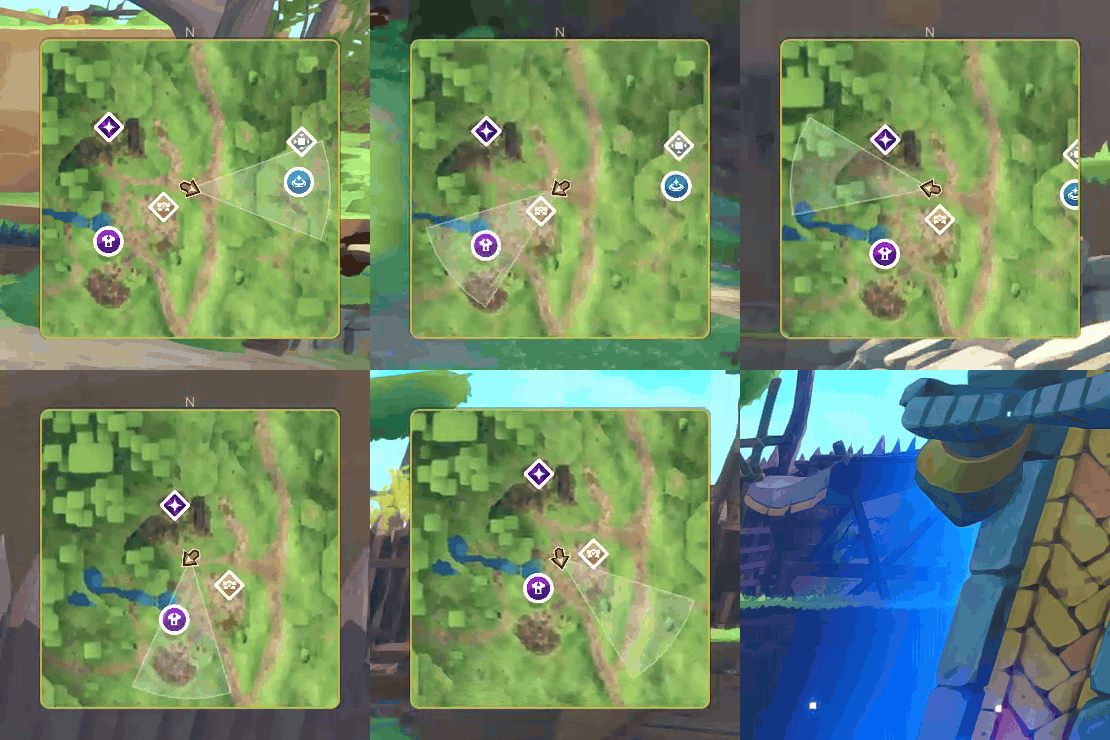
So I started separating that work into a native host, with an API that add-ons could use without knowing how the game represents things in memory. That’s the idea behind Farever More, and these are two of the add-ons running on it: the minimap and Dyno, a damage meter.
| Minimap | Dyno |
|---|---|
 |
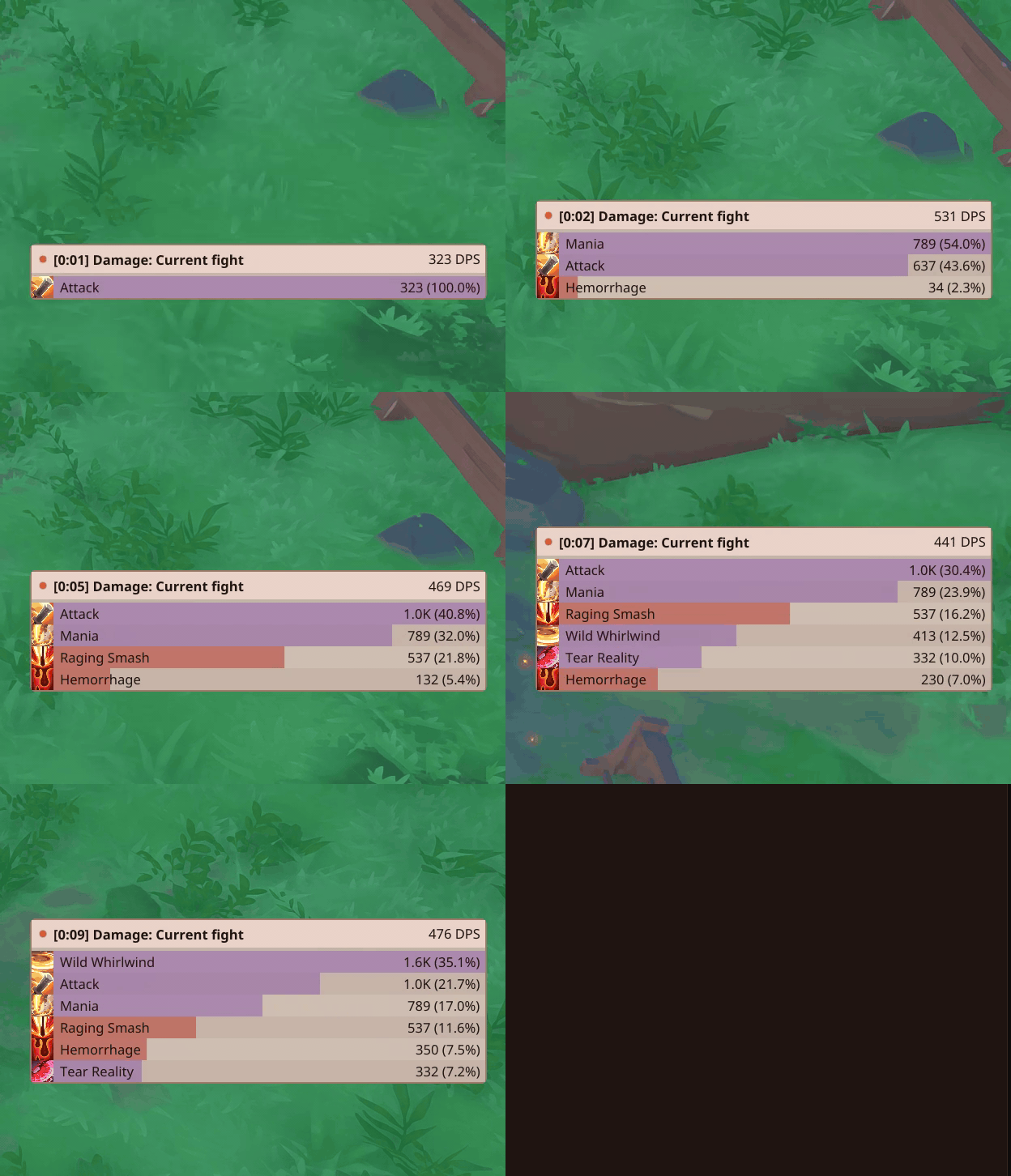 |
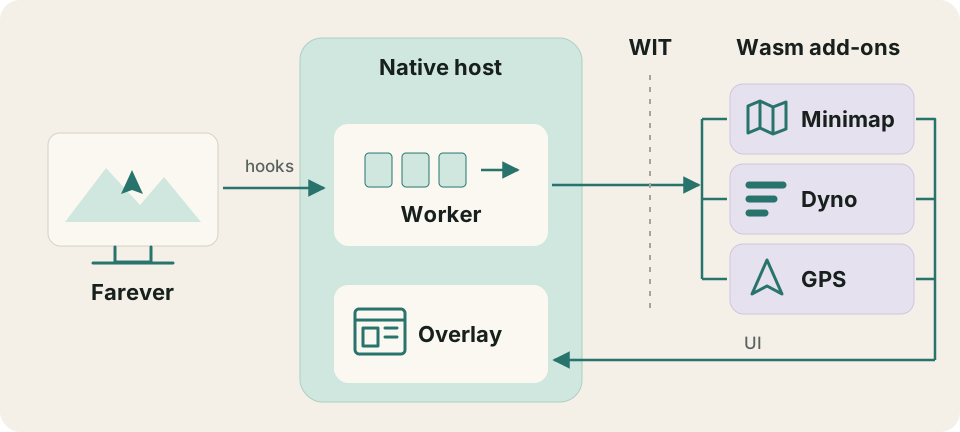
Both run as WebAssembly components inside the game process. They get their game state from the host and describe the UI they want it to draw, which leaves the native code responsible for the parts that depend on Farever’s internals. Let’s follow a damage event from the game into Dyno.
I’m hooked!
Before we can observe anything, we need to get our code into the process. Farever loads dinput8.dll, the Windows library for DirectInput, which applications use to work with input devices such as keyboards, mice, and controllers. We place a proxy with that name alongside the game, forwarding its calls to the real system library while also loading farever-addons/host.dll. That second DLL contains our framework: the game integration, Wasm runtime, and overlay renderer.
Farever uses HashLink, a virtual machine that runs programs compiled from Haxe. Its hlboot.dat bytecode file contains both the compiled program and useful information about its structure, including:
- type names
- struct definitions
- inheritance
- function signatures
I built a quick offline inspector utility to extract that information so I could browse it to compare game builds and search for interesting functionality. For example, for a damage meter, a method named ent.Unit.onInflictDamage is a fairly promising place to start looking.
Next up is MinHook, a small Windows library for redirecting native function calls. It patches the method so a call passes through our callback, which can inspect the arguments and invoke the original implementation. That gives us a place to observe damage while letting the game continue doing its own work.
Taking damage, taking notes
Each time the damage hook fires, the framework copies the observation into a queue and lets the game continue. A worker collects those observations, relates them to the current player and party, and groups the resulting events into ordered batches for the add-ons to consume. Add-ons execute exclusively on that worker, preventing them from blocking the game thread.
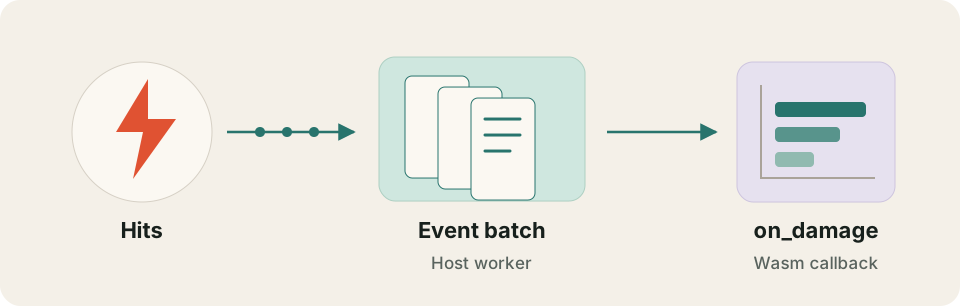
The host handles capture and delivery, while Dyno decides how to group hits by player or skill and calculate the totals.
Please keep your pointers to yourself
The add-on contract is written in WIT, the WebAssembly Interface Types language, which describes the functions and values exchanged between the host and the add-on as a Wasm component. Authors can use any language that produces a compatible Wasm component; our Rust SDK provides bindings and convenient callbacks for Rust. The framework’s WIT definitions are the shared contract regardless of language.
Here’s a simplified example of the damage-event record from the combat interface
record damage-event {
    // Event header, source, and target omitted.
    skill-id: string,
    skill-display-name: option<string>,
    // Skill icon omitted.
    amount: f64,
    hit-count: u32,
    critical: bool,
    killed: bool,
    blocked: option<f64>,
}
The Rust SDK unpacks that event batch into more idiomatic Rust callbacks. Here’s how Dyno handles one of those damage events:
fn on_damage(&mut self, context: &mut Context, damage: Damage) -> SdkResult<()> {
    let game = context.game();
    self.sync_game_state(game.party().value, game.instance().value);
    self.state.on_damage(damage)?;
    self.ensure_ticking(context);
    Ok(())
}Lua would like a word
If you’ve written add-ons for another game, this is probably where you’re wondering why I didn’t use Lua. It’s a fair question: Lua was designed to be embedded in applications, has a small runtime, and has a long history in games, including World of Warcraft. Being able to edit a script and reload it without setting up a component build is an attractive starting point for someone who just wants to move a few things around on screen.
Wasm also gives each add-on its own memory and access only to capabilities the host explicitly grants. Our host provides no filesystem or network access, so an add-on can’t read arbitrary files or make HTTP requests. Lua can also be restricted by its host.
The trade-off is a build and packaging step, a larger runtime, and tooling that varies by language. I think that’s worthwhile for the freedom it gives add-on authors, even if it takes a little more setup than dropping in a Lua script.
New Hero, who dis?
Add-ons will generally want to access and track player information. Unfortunately, that player object isn’t always stable within HashLink. When you enter a new zone, log out, or select another character, an add-on needs to follow the new player rather than keep tracking the old one. The damage hook may still work, but the player object we’ve cached can have been replaced. The runtime checks which object belongs to the active player and refreshes its state when that changes, masking that complexity from the add-ons themselves.
There are also plenty of interesting edge cases. For example, the player can exist in memory while the loading screen is still up. Instead of having each add-on determine its own slightly different interpretation of the “player is ready” state for a character, the runtime provides it for you.
You don’t have to go home, but you can’t stay on screen
Rendering is another place where separate add-ons would end up solving the same problems. A minimap needs to draw over the game, a damage meter needs to handle clicks, and both need to coexist with the game’s own input. Giving each add-on its own rendering setup would spread that integration work across every project, along with the bugs and maintenance that come with it.
Instead, add-ons describe their UI using widgets and canvas primitives, and the host checks and draws those frames in a shared overlay. That description can cross the same WIT interface as everything else, keeping native graphics handles out of the add-on API. It also means we can improve the renderer without asking every author to rewrite their UI. The trade-off is that authors work within the drawing features the API exposes, which is currently a bit limited IMHO.
The add-ons are talking behind my back
Putting add-ons in separate Wasm components gives them their own memory, but we still want them to work together. The host provides a message bus for that: an add-on subscribes to a named topic during activation, and other add-ons can publish messages to its subscribers or address a particular subscriber directly. The sender and receiver agree on the payload format; the host handles routing and delivery without needing to understand what the message means.
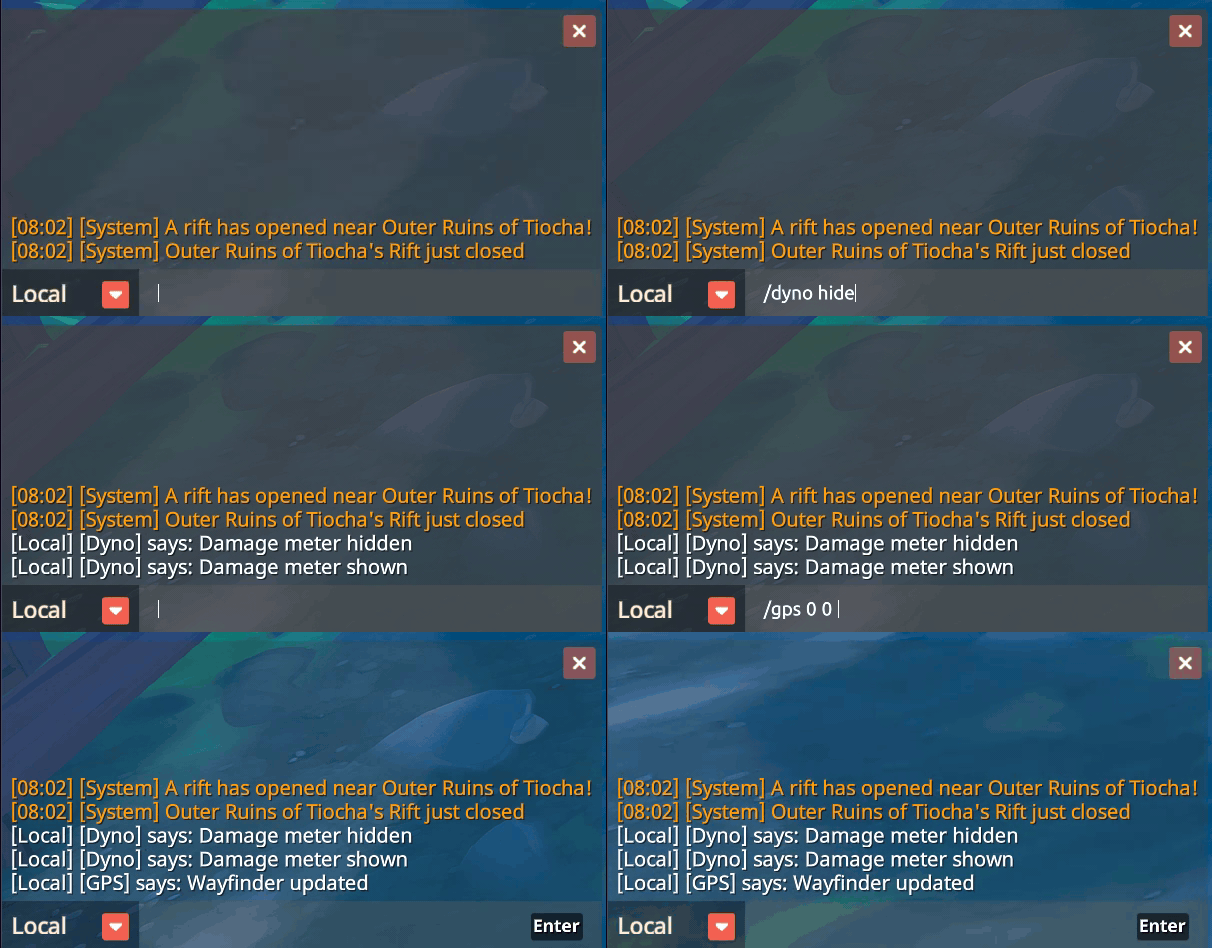
Chat commands use this same path. When you type /dyno reset, the host turns it into a message on the dyno topic with reset as its payload. Dyno receives it through its message callback, clears the encounter, and prints a local response under its own name. The host doesn’t need a built-in damage-meter command handler.
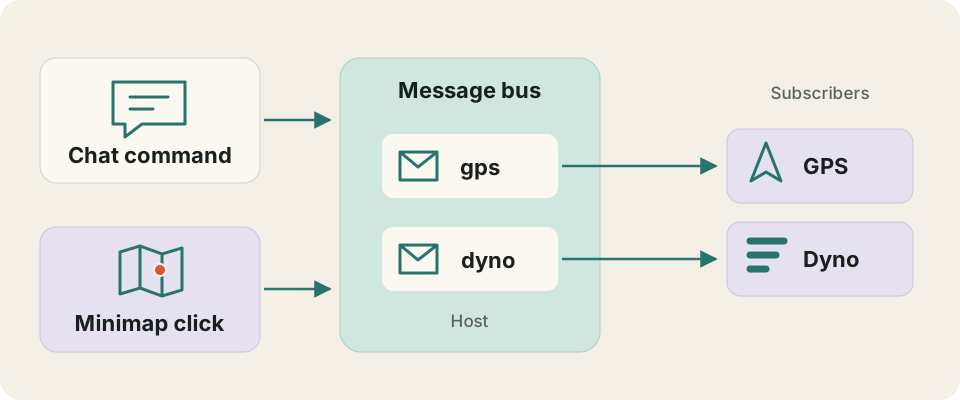
The minimap uses this to cooperate with the GPS add-on. Clicking a point of interest publishes its coordinates and name on the gps topic, just as a player could enter them in chat:
Chat:          /gps 120 80 "Meeting point"
Minimap click: topic = "gps", payload = '120 80 "Meeting point"'
GPS handles the arrow in both cases, while the minimap only needs to describe the destination. The host stamps messages with their sender, so GPS can also respect the player’s setting for map-click requests without disabling their typed commands.
An add-on can build an asynchronous RPC-style exchange on top of this too: both sides subscribe to their protocol’s topics, then the caller sends a request with a correlation ID and the receiver replies directly with the same ID. For example, a future route-planning add-on could ask another add-on for a saved route:
Planner -> Route library: request #42, "get route: gathering-loop"
Planner <- Route library: reply   #42, [waypoint, waypoint, ...]
The reply arrives in a later callback, so the caller must keep track of pending requests and handle missing replies. Messages are queued, bounded, and not retried automatically. This is enough to let add-ons cooperate without calling into each other’s memory or sharing an implementation language.
Here’s the chat side in action, with Dyno responding to commands to reset its totals or hide its window:
Game on
If you’re interested, you can download the latest release of the framework and add-ons.

Only Windows is currently supported, but as I’m going to be exploring some Linux-based gaming in the future, Linux support will likely follow.
Bug reports and improvement requests are welcome, as are fixes and new add-ons. If you fancy building something, the Rust SDK guide, WIT contract, and reference add-ons in the repository should help you get started.
I’m looking forward to seeing what other people build with this, and perhaps getting a bit more playing time in myself. At least I have a minimap now.